
This document is a detailed configuration guide for ADSL2/2+ user terminal equipment. The document provides guidance on hardware connections, warnings, and broadband dial-up internet access. The device has stable performance and high-speed connectivity, suitable for ADSL2/2+ networks.
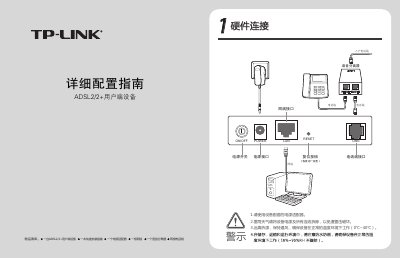
The manual explains how to connect the ADSL2/2+ device, power adapter, voice splitter, telephone lines and Ethernet cable, and includes safety notes such as removing power during thunderstorms and operating within 0 °C‑40 °C temperature range.
It also guides users through Windows broadband dial‑up configuration, explains the meaning of power, ADSL and LAN indicator LEDs, shows how to upgrade firmware via the web interface, and offers a FAQ with common troubleshooting steps. This manual is written in Chinese.
| Firmware version | 1.2.1 Build 080811 Rel.52823 |
|---|
Check that the power plug is firmly inserted, the power adapter is correctly connected and matches the device specifications, and that the power switch is turned on.
Press and hold the RESET button for 5‑10 seconds, then release it to restore factory defaults.
Verify that the telephone line is properly connected, the voice splitter is correctly installed, and that the line itself is functional; contact your ISP if the issue persists.