
Key facts
- Brand
- Jabra
- Model
- BT320S
- Industry
- Electronics
- Documents
- 2
- Languages
- EN · ZH
- Last added
- 2012-05-09
Start here
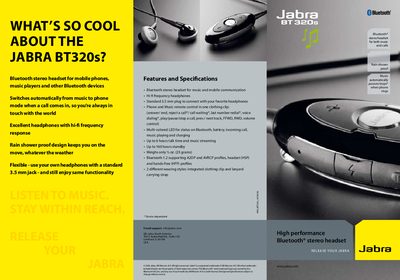
Jabra BT320s User Manual
The Jabra BT320s is a Bluetooth stereo headset designed for music and phone use. It features hi‑fi headphones, a 3.5 mm audio jack, multi‑colored LED status indicators, and a rain‑shower‑proof design. The headset automatically switches from music to phone mode when a call arrives, allowing you to keep the volume high while staying reachable.
The manual includes a quick‑start guide that walks you through charging, turning on, pairing with a device, and using the built‑in controls for music playback, call handling, and volume adjustment. It also lists the headset’s specifications such as talk time, standby time, and Bluetooth profile support.
Jabra BT320S specifications
| Talk time | Up to 6 hours |
|---|---|
| Standby time | Up to 160 hours |
| Bluetooth version | 1.2 |
| Audio jack | Standard 3.5 mm plug |
| LED indicators | Multi‑colored status LED |
Source: Jabra BT320s User Manual
All Jabra BT320S documents by type
How to use the product for one specific task, with worked examples.
Day-to-day operation, settings and troubleshooting. Start here if the product is already set up.
Questions answered in these manuals
How do I pair the Jabra BT320s with a Bluetooth device?
Charge the headset, turn it off, then press and hold the answer/end button until the LED turns solid blue. Set your device to discoverable and confirm pairing with passkey 0000.
From: Jabra BT320s User Manual
What happens to music playback when a call comes in?
Music automatically pauses or stops when a call is received, and resumes after the call ends.
From: Jabra BT320s User Manual