
Jabra BT320s is a Bluetooth stereo headset for music and mobile communication. It features hi-fi frequency headphones and a standard 3.5 mm plug to connect with your favorite headphones. The headset has a phone and music remote control in one clothing clip, allowing you to answer/end calls, control music playback, and adjust volume. It has a multi-colored LED for status indications and offers up to 6 hours of talk time and music streaming. The BT320s supports Bluetooth 1.2 with A2DP and AVRCP profiles, as well as headset (HSP) and hands-free (HFP) profiles. It comes with two different wearing styles: an integrated clothing clip and a lanyard carrying strap.
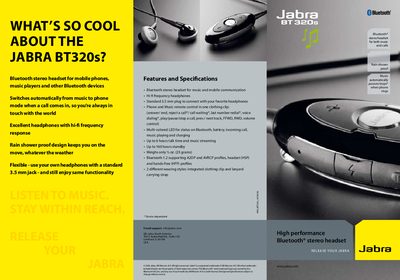
The Jabra BT320s is a Bluetooth stereo headset designed for music and phone use. It features hi‑fi headphones, a 3.5 mm audio jack, multi‑colored LED status indicators, and a rain‑shower‑proof design. The headset automatically switches from music to phone mode when a call arrives, allowing you to keep the volume high while staying reachable.
The manual includes a quick‑start guide that walks you through charging, turning on, pairing with a device, and using the built‑in controls for music playback, call handling, and volume adjustment. It also lists the headset’s specifications such as talk time, standby time, and Bluetooth profile support.
| Talk time | Up to 6 hours |
|---|---|
| Standby time | Up to 160 hours |
| Bluetooth version | 1.2 |
| Audio jack | Standard 3.5 mm plug |
| LED indicators | Multi‑colored status LED |
Charge the headset, turn it off, then press and hold the answer/end button until the LED turns solid blue. Set your device to discoverable and confirm pairing with passkey 0000.
Music automatically pauses or stops when a call is received, and resumes after the call ends.
It supports A2DP for stereo audio, AVRCP for remote control, and the headset (HSP) and hands‑free (HFP) profiles.