
Key facts
Start here
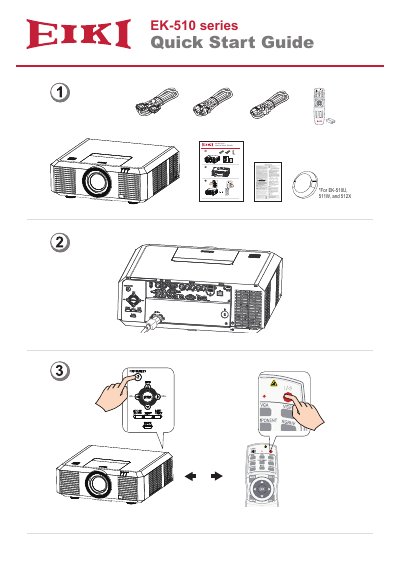
EIKI EK-510 Series Projector Quick Start Guide
This EIKI quick start guide covers the EK-510 series, specifically the EK-510U, 511W and 512X. It shows the connection panel of the unit - video inputs such as DVI-D, VGA IN, S-VIDEO and VIDEO, component jacks G/Y, B/PB and P/PR with H/HV and V, plus AUDIO IN1, AUDIO IN2, AUDIO OUT, MONITOR OUT, RS-232C and R/C IN and R/C OUT - and lists the selectable input sources including VGA, RGBHV, HDMI 1, HDMI 2 (MHL), HDBaseT, Component Video, S-video, Memory Viewer, Network and USB Display.
The guide also reproduces the remote control key layout, with buttons for INPUT, MENU, FREEZE, MUTE, BLANK, LAMP, PATTERN, KEYSTONE, TIMER, INFO., SCREEN, IMAGE, AUTO, D.ZOOM, VOLUME and the PC/AV/VIDEO/HDMI source keys. The final page lists EIKI contact addresses and phone numbers for the U.S.A., Canada, China, South East Asia, Germany and Austria, Eastern Europe, Oceania, and Japan and worldwide.
EIKI 512X) specifications
| Models covered | EK-510U, 511W, 512X |
|---|---|
| Digital and network inputs | HDMI 1, HDMI 2 (MHL), HDBaseT, DVI-D |
| Audio terminals | AUDIO IN1, AUDIO IN2, AUDIO OUT |
| Control terminals | RS-232C, R/C IN, R/C OUT |
All EIKI 512X) documents by type
Day-to-day operation, settings and troubleshooting. Start here if the product is already set up.
The shortest path to a working setup, usually only a few pages.
Questions answered in these manuals
What models are covered in this manual?
The manual covers EIKI projectors models EK-512X, EK-511W, EK-510U, ES-LX80, and ES-LU70.
From: EIKI EK-512X/EK-511W/EK-510U ES-LX80/ES-LU70 Projector User Manual
What is the brand of this projector?
The brand is EIKI, as stated by EIKI INDUSTRIAL CO., LTD.
From: EIKI EK-512X/EK-511W/EK-510U ES-LX80/ES-LU70 Projector User Manual
Which models does this quick start guide cover?
It covers the EK-510U, 511W and 512X.
Which HDMI inputs are available?
HDMI 1 and HDMI 2, the second being an MHL input; HDBaseT is also listed among the input sources.