
The Dell™ Dimension™ 3100/E3100 Owner's Manual provides information about the computer and its components.
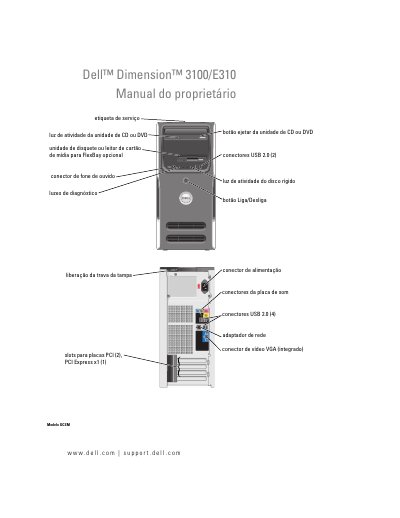
This document is the Portuguese Owner's Manual for the Dell Dimension 3100 and E3100 desktop computers. It provides comprehensive instructions for setting up the computer, connecting peripherals such as printers and networks, and managing power options including sleep and hibernation modes. The guide also details how to use the included software tools for driver identification and system restoration. This manual is written in Portuguese.
| Supported Memory Type | DDR2 |
|---|---|
| USB Ports | 2.0 (4) |
| PCI Slots | (2) |
| PCI Express Slots | x1 (1) |
Use the service label to identify the computer when visiting the support website or contacting technical support.
It is used for advanced troubleshooting and checking the system status.
You can use the Dell PC Restore feature or the Microsoft Windows XP System Restore feature.