
The Dell Dimension 5150C User's Guide provides information on how to use the Dell Dimension 5150C computer.
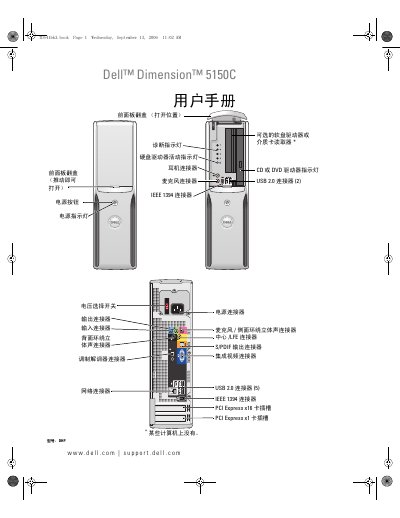
This user manual covers the setup and usage of the Dell Dimension 5150C desktop computer. It includes instructions for connecting peripherals such as printers, USB devices, and modems, as well as configuring network settings and managing power options. The guide also explains how to play media and adjust system settings. This manual is written in Chinese.
| Processor Type | Intel Pentium 4 5XXX and 6XXX processors, Pentium D 8XXX dual-core processors, or Intel Celeron D processors |
|---|---|
| Memory Type | 400 MHz and 533 MHz DDR2 unbuffered SDRAM |
| Maximum Memory | 4 GB |
| Height | 31.8 cm (12.5 inches) |
| Weight | 6.89 kg (15.2 lb) |
The maximum memory capacity is 4 GB.
The manual suggests using the recommended tools listed in the 'Before You Begin' section.