
Key facts
Start here
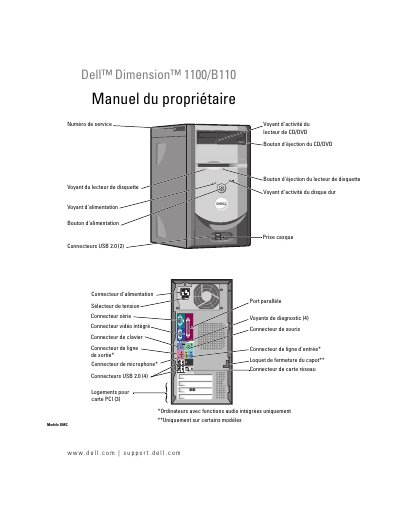
Dell Dimension 1100/B110 Computer Owner's Manual
This manual is for the Dell Dimension 1100/B110 computer and covers setup and use, troubleshooting, advanced troubleshooting, and removing and installing parts.
It also explains where to find the service number and express service code, how to use the Dell support site, and how to open Windows Help and Support. This manual is written in French.
Dell Dimension 1100 specifications
| Processor type | Intel Pentium 4 with HT Technology and Intel Celeron |
|---|---|
| Memory Type | 333- and 400-MHz DDR SDRAM |
| Maximum memory | 2 GB |
| System Clock | 800 MHz |
| NIC capability | 10/100 communication |
| Power supply output | 250-W |
All Dell Dimension 1100 documents by type
Disassembly, diagnostics and part numbers, for repair.
Day-to-day operation, settings and troubleshooting. Start here if the product is already set up.
Questions answered in these manuals
What tools are recommended for this service manual?
The procedures may require a small flat-blade screwdriver and a Phillips screwdriver.
Who should perform repairs on this computer?
Only a certified service technician should perform repairs on your computer.
Where are the service number and express service code located?
They are on labels on the computer.
What is the Dell support website?
The Dell support site is support.dell.com.
Where can I find the Service Tag?
The Service Tag is located on the label affixed to the computer.
What should I do if the computer does not start?
Refer to the troubleshooting section for problems related to the computer not starting.