
Moeller PS3 Series PLC Human-Machine Connection Guide

This guide provides connection settings, station numbers, and address definitions for the Moeller PS3 Series PLC human-machine interface.
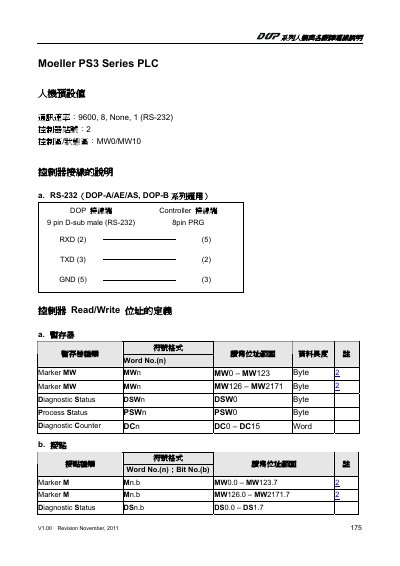

Moeller PS3 Series PLC Human-Machine Connection Guide - cover page
Brand
Moeller
Category
Industrial Robot
Document type
User Manual
Language
Chinese
Pages
2
File format
PDF
File size
71 KB
Published
28 October, 2026
Updated
28 October, 2026
MD5 checksum
104C0BF4BF8538E23F38E8FC5632F9A7

About this manual

This document outlines the default settings for connecting the Moeller PS3 Series PLC to a human-machine interface (HMI) via RS-232. It specifies the communication speed, controller station number, and default memory areas for control and status regions. This manual is written in Chinese.

What's inside

  • Human-Machine Connection
  • Default Settings
  • RS-232 Wiring
  • Address Definitions
  • Registers
  • Contacts
  • Process Status
  • Diagnostic Status

Specifications

Communication Speed9600, 8, None, 1
Controller Station Number2
Control AreaMW0
Status AreaMW10
Connector Type9 pin D-sub male

Frequently asked questions

What is the default communication speed for the PS3 Series PLC?

The default communication speed is 9600, 8, None, 1.

What is the default controller station number?

The default controller station number is 2.

Which memory word addresses are used for the control and status areas?

The control area is MW0 and the status area is MW10.

Download PDF (71 KB)

More Moeller Manuals


View all Moeller manuals →