
This manual provides operating instructions for the Delta VFD-PU06 digital communication panel, covering function descriptions, parameter settings, and…
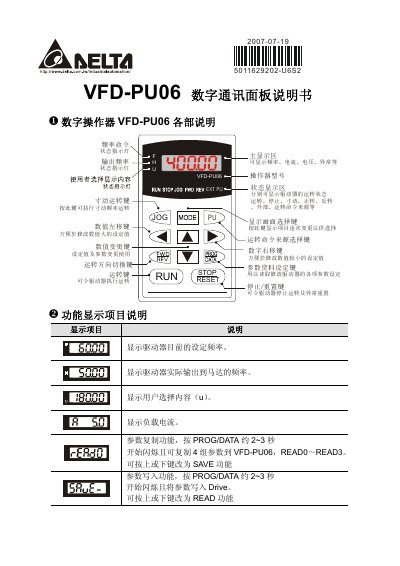
The Delta VFD-PU06 is a digital communication panel designed for variable frequency drives. It features a display screen and various keys for selecting items, setting parameters, and controlling drive operations such as Jog, Run, Reset, and Stop. The panel allows users to read and modify drive settings and display status information like frequency, current, voltage, and error states.
The manual details the functions of specific keys, including the Selection Key for changing items, the Parameter Setting Key for reading and modifying data, and the Jog/Run/Reset/Stop keys for controlling the drive. It also explains how to use the Up/Down keys to navigate values and the PROG/DATA key for parameter copy and write functions, which involve a 2 to 3 second press to initiate the process. This manual is written in Chinese.
Press the PROG/DATA key for about 2 to 3 seconds until it starts flashing to begin copying 4 sets of parameters.
If the display shows 'End' for about one second, it means the data has been accepted and automatically stored in the internal memory.