
The Canon RF70-200mm F4 L IS USM User Manual provides safety, installation, operation, and specifications for the lens.
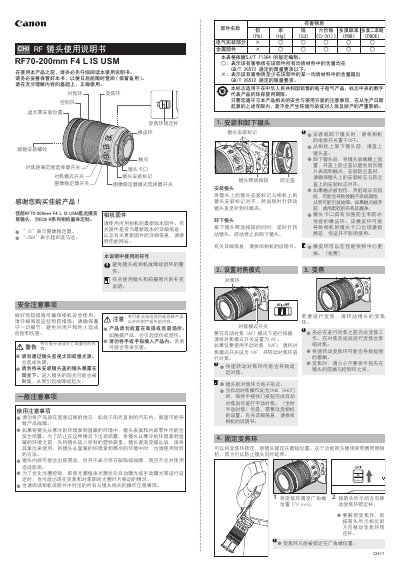
This manual explains safety precautions for handling the RF70-200mm F4 L IS USM lens, including temperature limits, condensation prevention, and proper storage. It also details lens installation, removal, and care of the lens mount, filter threads, and protective accessories.
The guide covers operational features such as focus mode selection, zoom operation, zoom‑lock, control‑ring functions, image‑stabilizer modes, and the use of lens hood, filters, and optional close‑up lenses. A full specifications table lists optical and physical parameters of the lens. This manual is written in Chinese.
| Focal length / aperture | 70-200mm f/4 |
|---|---|
| Lens construction | 11 groups, 16 elements |
| Maximum aperture | f/4 |
| Minimum aperture | f/32 |
| Horizontal angle of view | 29°‑10° |
| Vertical angle of view | 19°30′‑7° |
| Diagonal angle of view | 34°‑12° |
| Minimum focusing distance | 0.6 m |
| Maximum magnification | 0.28× (200 mm) |
| Filter diameter | 77 mm |
| Maximum diameter × length | ≈83.5 mm × 119 mm |
| Weight | ≈695 g |
| Lens hood model | ET-83G (WIII) |
| Lens cap model | E-77 II |
| Soft case model | LP1319 |
Place the lens in a sealed plastic bag before allowing it to warm, then remove it once it has gradually reached room temperature.
Set the image stabilizer switch to ON to enable stabilization, or to OFF to disable it.
Move the zoom‑ring lock lever in the direction shown to lock the zoom ring at the wide‑end; move it opposite to unlock.
The minimum focusing distance is 0.6 m.