
CASIO watch 2548/2821 user manual, introduces the functions and usage methods of the watch, including timer mode, world time mode, alarm mode, countdown timer mode, stopwatch mode, etc.
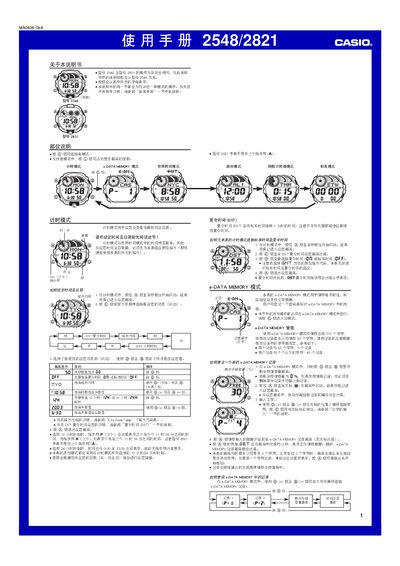
This manual explains how to operate the Casio 2548/2821 digital watch. It covers basic time‑keeping, setting alarms, using the world‑time feature, managing e‑DATA MEMORY, and configuring lighting options.
Detailed procedures are given for each mode, including password protection for stored data, automatic illumination, countdown timer settings, and stopwatch operation. Reference tables for city codes and character input are also included. This manual is written in Chinese.
| Total e‑DATA MEMORY capacity | 315 characters |
|---|---|
| Maximum characters per record | 63 characters |
| World‑time city entries | 27 cities (29 time zones) |
| Year‑setting range | 2000‑2039 |
| Display illumination type | EL (electroluminescent) panel |
| Number of alarms | 5 (4 single, 1 intermittent) |
| Default countdown start time | 15 minutes |
| Stopwatch display limit | 23 h 59 m 59.99 s |
In Timekeeping mode, press and hold the A button until the seconds digits flash, then use the C button to select items and the D/B buttons to change values; press A again to exit.
Enter e‑DATA MEMORY mode, press D/B to show the password screen, then press A to set a 4‑digit password that secures the stored data.
In any mode, hold the L button for about 1 second to toggle automatic illumination on or off; an indicator appears when it is active.
The watch can display the time for 27 cities covering 29 time zones.