
NETGEAR ReadyNAS NV+ Installation Guide, introduces the installation of the device, the installation of hard disks, the installation of the RAIDar application, the connection of the network, the initialization of the hard disk, etc.
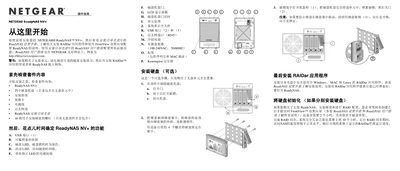
This manual walks you through the ReadyNAS NV+ setup, starting with checking the kit contents and installing hard drives. It explains the hardware features such as USB ports, Ethernet RJ45, LCD panel, LEDs, and the optional Kensington lock.
After hardware installation, the guide covers installing the RAIDar application, configuring the FrontView setup wizard, connecting the unit to a network or directly to a PC, and troubleshooting common LED error indications. Technical support contact information is provided at the end. This manual is written in Chinese.
| Drive bays | 4 |
|---|---|
| USB ports | 3 |
| Ethernet port | RJ45 |
| Power input | 100‑240VAC, 50/60 Hz |
| LCD display | Present |
| Kensington lock | Present |
| Programmable backup button | Present |
| Disk LED indicator | Green when online |
| Activity LED | Flashes when accessing |
RAID synchronization can take between 2 and 10 hours, and the NAS will operate slower while the sync is in progress.
A disk LED that flashes once per second signals that a bad disk has been detected.