
NetGear Push2TV Installation and Usage Instructions
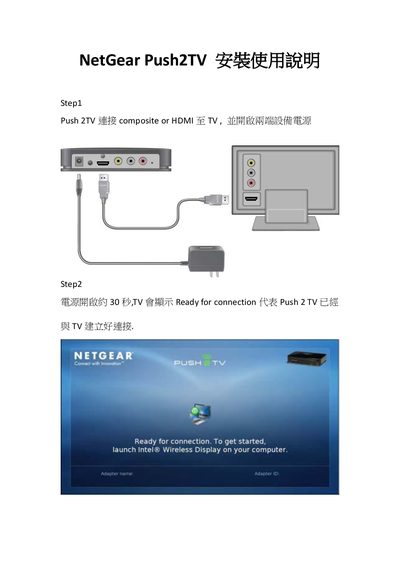
The manual walks you through connecting the Push2TV to a TV via composite or HDMI, powering it on, and launching the Intel Wireless Display software on your computer. After scanning for adapters, you select Push2TV and complete pairing by entering the displayed PIN.
Four simple steps are shown: connect the video cable, wait about 30 seconds for the device to become ready, launch the Intel Wireless Display app and scan for the adapter, then enter the 4‑digit code shown on the TV to finish the setup. This manual is written in Chinese.
| Video input | Composite or HDMI |
|---|---|
| Power‑on time | ≈30 seconds |
The TV shows the message "Ready for connection".
Launch the Intel Wireless Display application on your computer and scan for available adapters.
In the Intel Wireless Display app, choose "Scan for available adapters" and select Push2TV.