
Dell Inspiron 3656 Quick Start Guide

The Dell Inspiron 3656 Quick Start Guide provides instructions on how to connect the network cable, display, and power cord, as well as how to set up the keyboard and mouse.
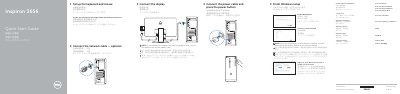

Dell Inspiron 3656 Quick Start Guide - cover page
Brand
DELL
Category
Desktops
Document type
Quick Start Guide
Language
Chinese
Pages
2
File format
PDF
File size
568 KB
Published
26 November, 2023
Updated
26 November, 2023
MD5 checksum
12AA2EE3A72AA35DD1B09881280C72BA

About this manual

This guide helps you connect peripherals, set up Windows, and enable Dell updates. It includes a diagram of the computer’s ports and features. The guide is multilingual, supporting Chinese, English, Japanese, and Korean text. This manual is written in Chinese.

What's inside

  • Connect the network cable
  • Connect the display
  • Connect the power cable
  • Set up the keyboard and mouse
  • Finish Windows setup
  • Enable Dell updates
  • Connect to your network
  • Sign in to your Microsoft account or create a local account
  • Features
  • SupportAssist

Frequently asked questions

Is connecting a network cable required during setup?

No, connecting the network cable is listed as optional.

Where should I connect the display if my computer was ordered with a discrete graphics card?

Connect the display to the discrete graphics card instead of the standard video output.

How many USB 2.0 ports does the Inspiron 3656 have?

It has 4 USB 2.0 ports.

How do I create recovery media for this computer?

In Windows search, type Recovery, click Create a recovery media, and follow the instructions on the screen.

Download PDF (568 KB)

More DELL Manuals


View all DELL manuals →