
The Dell Latitude 5580 Quick Start Guide provides information on how to use the Dell Latitude 5580 notebook computer.
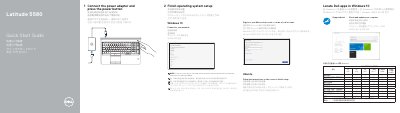
This quick start guide for the Dell Latitude 5580 notebook walks through first-time setup in two steps: connecting the power adapter and pressing the power button, then finishing the operating system setup. For Windows 10 it covers connecting to a network (including entering the password for secured wireless networks), signing in to a Microsoft account or creating a local account, and locating Dell apps such as SupportAssist, which checks and updates the computer. For Ubuntu, users follow the on-screen instructions to finish setup.
The guide also includes a numbered diagram of the computer's features, listing ports and components such as the network port, HDMI and VGA ports, USB 3.0 ports (one with PowerShare), DisplayPort over Type-C connector with optional Thunderbolt 3, SD card reader, smart card reader, optional fingerprint reader and IR camera, touchpad, and the service tag label. It closes with support links (Dell.com/support, Dell.com/support/manuals), regulatory and safety information, and the regulatory model P60F / regulatory type P60F001. Text is provided in English, Simplified Chinese, Traditional Chinese, Japanese and Korean.
| Rated voltage | 100 - 240 V |
|---|---|
| Rated frequency | 50 - 60 Hz |
| Rated input current | 1.7 A / 2.5 A |
Enter the password for the wireless network access when prompted.
At Dell.com/support and Dell.com/support/manuals; regulatory and safety information is at Dell.com/regulatory_compliance.