
Inspiron 3646 Quick Start Guide
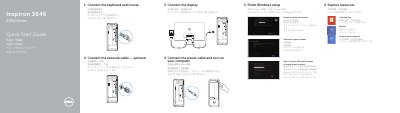
This Quick Start Guide walks through setting up the Dell Inspiron 3646 desktop: connecting the keyboard, mouse, display, optional network cable, and power cable, then finishing Windows setup, enabling security and updates, signing in to a Microsoft or local account, and connecting to a network.
The guide also identifies the computer's features, including the power button, hard-drive activity light, Service Tag label, media-card reader, optical-drive bay, USB 2.0 and USB 3.0 ports, HDMI-out and VGA ports, audio ports, and security features such as the padlock ring and security-cable slot. It lists support resources at dell.com/support and the regulatory model D10S.
| Front USB 2.0 ports | 2 |
|---|---|
| Rear USB ports | 2 x USB 2.0, 1 x USB 3.0 |
| Video outputs | HDMI-out port, VGA port |
| Audio ports | 3 |
Connect the keyboard and mouse, the display, an optional network cable, and the power cable, then turn on the computer and finish Windows setup.
The guide points to dell.com/support and dell.com/support/manuals for product support and manuals.
The guide lists registering the computer as a setup step under Explore resources, alongside Help and Tips and My Dell.