
OptiPlex 3050 Micro Desktop Quick Start Guide
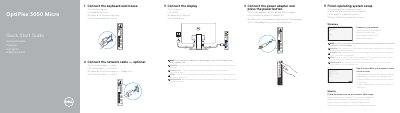
This is the Dell quick start guide for the OptiPlex 3050 Micro computer. It walks through the basic setup in numbered steps: connecting the keyboard and mouse, connecting the network cable (optional), connecting the display, connecting the power adapter and pressing the power button, and finishing operating system setup for Windows or Ubuntu.
The guide then shows where to find Dell apps such as SupportAssist, lists the front and back features of the computer with numbered callouts, and gives Dell support and contact web addresses. The regulatory model is D10U and the regulatory type is D10U002. The text is printed in English, Danish, Finnish, Norwegian and Swedish.
| USB 3.0 ports | Listed as features 5 and 16 |
|---|---|
| HDMI port | Listed as feature 11 |
| Network port | Listed as feature 13 |
| USB 2.0 port | One port supports Smart Power On |
| Optional port option | VGA port or Serial port or PS/2 port or DisplayPort |
| Security | Kensington security cable slot and padlock ring |
Connect the display to the discrete graphics card instead of the onboard port.
Enter the password for the wireless network access when prompted.
The USB 2.0 port listed as feature 14 supports Smart Power On.
Dell lists Dell.com/support and Dell.com/support/manuals for product support and manuals.