
The Dell OptiPlex 7050 Small Form Factor is a powerful computer with the following features: 1. 7th Generation Intel Core i5-7500 Processor 2. 8GB Memory 3. 256GB Solid State Drive 4. NVIDIA GeForce GTX 1050 Graphics 5. Windows 10 Operating System
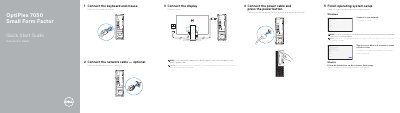
The Dell OptiPlex 7050 Small Form Factor quick start guide shows how to connect the keyboard and mouse, optional network cable, display, and power cable, then press the power button. It then covers finishing Windows or Ubuntu operating system setup and locating Dell apps such as SupportAssist.
The guide labels 25 features on the computer, including optical drive, USB, HDMI, DisplayPort, serial, PS/2, network, and VGA ports, expansion card slots, power connector, diagnostic light, and security slots. It lists Dell support and contact links and gives regulatory model D11S, regulatory type D11S002, and computer model OptiPlex 7050 SFF.
| Computer model | OptiPlex 7050 SFF |
|---|---|
| Regulatory model | D11S |
| Regulatory type | D11S002 |
| Optical drive | Optional |
| HDMI port | HDMI port |
| USB port | USB 3.0 Type-C port |
| Network port | Network port |
| Serial port | Serial port |
| Power supply diagnostic light | Power supply diagnostic light |
| Security slot | Kensington security cable slot |
It shows connecting the keyboard and mouse, optional network cable, display, power cable, then pressing the power button.
Connect the display to the discrete graphics card.
Follow the instructions on the screen to finish setup; the guide also mentions connecting to your network and signing in to a Microsoft account or creating a local account for Windows.
The guide lists Dell.com/support, Dell.com/support/manuals, Dell.com/support/windows, and Dell.com/contactdell.