
Dell Inspiron 24-5459 Quick Start Guide
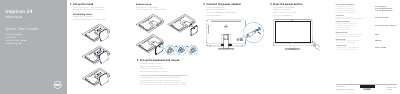
The Dell Inspiron 24-5459 quick start guide walks through initial setup: connecting the power adapter, pressing the power button, installing the pedestal or articulating stand, and setting up the keyboard and mouse. It includes Danish, Norwegian, Spanish, and Swedish translations alongside English headings.
The guide lists the computer's features, including microphones, camera, media-card reader, USB 3.0 and USB 2.0 ports, HDMI-in and HDMI-out ports, audio ports, power and screen controls, and an optional optical drive. It also covers tilting the stand, finishing Windows setup, connecting to a network, and finding Dell support and help documentation.
| USB 3.0 ports | 2 |
|---|---|
| USB 2.0 ports | 4 |
| Brightness-control buttons | 2 |
| Optical drive | Optional |
The computer has two USB 3.0 ports.
Press the power button.
See the documentation that shipped with the keyboard and mouse.
Click Start → All Programs → Dell Help Documentation.