
Quick Installation Guide pdf file for TP-Link EAP650 V1 wireless AP devices, introduces hardware components, LED indicators, ports, initialization, reset, upgrade and other functions
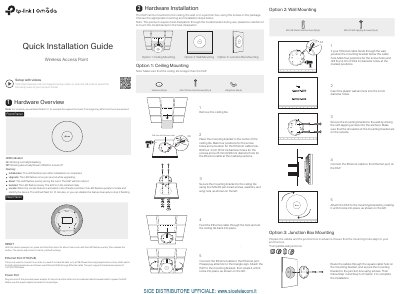
TP-Link EAP650 V1 is a wireless access point used as the example throughout this quick installation guide. The guide describes the front and rear panel, including LED indicator behavior, the RESET button, the ETH (PoE) Ethernet port, and the power port. It also lists package contents such as screws, wall anchors, washers, and wing nuts.
Installation options cover ceiling, wall, and junction box mounting. The EAP can be powered by a power adapter or a PSE device such as a PoE switch compliant with 802.3at. Software setup can be done in Standalone Mode through the Omada app or a web browser, or in Controller Mode using an Omada Software Controller or Omada Hardware Controller (OC200/OC300). Safety information is included.
| Ethernet Port Speed | 10/100/1000 Mbps |
|---|---|
| PoE Standard | 802.3at |
| Mounting Options | Ceiling, wall, or junction box |
| Power Source | Power adapter or PSE device (such as a PoE switch) |
With the device powered on, press and hold the RESET button for about 5 seconds until the LED flashes quickly, then release it.
Use admin for both Username and Password to log in.
The Ethernet port supports transmission speeds of 10/100/1000 Mbps.
It can be powered by a power adapter or a PSE device such as a PoE switch compliant with 802.3at.