
Olympus FV1200 MPE Microscope User Guide

This is a user manual for Olympus FV1200 MPE Microscope
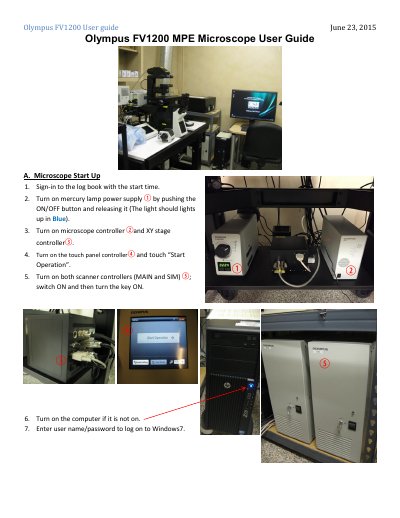

Olympus FV1200 MPE Microscope User Guide - cover page
Brand
Olympus
Category
microscope
Document type
User Manual
Language
English
Pages
12
File format
PDF
File size
1.8 MB
Published
27 October, 2023
Updated
27 October, 2023
MD5 checksum
3CEBCDB301B9CEE1AB6F4D87A1C61FE6

About this manual

This manual provides instructions for starting up the Olympus FV1200 MPE microscope system, including powering on the mercury lamp, controllers, touch panel, and scanners. It also details the process for logging into the Windows 7 operating system and launching the FV10-ASW program.

What's inside

  • Microscope Start Up
  • Laser start up
  • Outline of Acquisition Setting
  • Overview of Image Acquisition Control window
  • Viewing with Transmitted or Epifluorescence Light
  • Image Acquisition (Multicolor imaging)
  • Sequential Scanning Mode
  • Z-Series (xyz) Image Acquisition
  • Time-Series (xyt) Image Acquisition

Frequently asked questions

What is the default image size setting for the microscope?

The default image size is set to 512x512 pixels.

What scan speed is recommended for good image quality?

A scan speed between 12.5 and 20 microseconds per pixel is considered good.

How do you set a one-minute interval for time-lapse imaging?

To set a one-minute interval, you must type 60 and press the Enter key.

Download PDF (1.8 MB)

More Olympus Manuals


View all Olympus manuals →