
Zebra 105SL Barcode Printer Quick Reference Guide

This document is a quick reference guide for the Zebra 105SL barcode printer, providing information on the printer's appearance, control panel, printer components, and instructions for installing media.
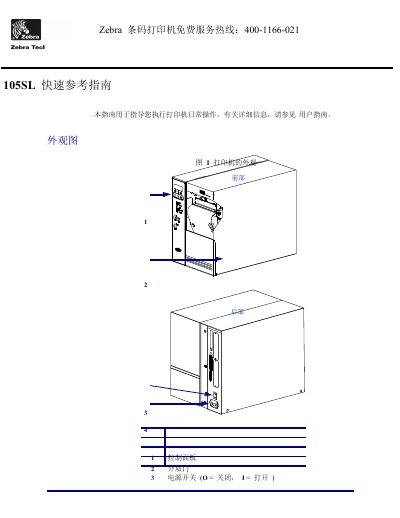

Zebra 105SL Barcode Printer Quick Reference Guide - cover page
Brand
Zebra
Category
Printer
Document type
User Manual
Language
Chinese
Pages
15
File format
PDF
File size
609 KB
Updated
28 September, 2023
Model
105SL
MD5 checksum
FD4EDEB5DA1B03B2ACD0291D6341D1A8

About this manual

This document serves as a quick reference guide for the Zebra 105SL barcode printer, designed to assist users with daily operations. It includes visual diagrams of the printer's exterior and interior components, as well as an explanation of the control panel indicators and buttons. This manual is written in Chinese.

What's inside

  • Printer Appearance
  • Control Panel
  • Printer Components
  • Media Installation
  • Ribbon Installation
  • Removing Old Ribbon

Frequently asked questions

What is the purpose of the Quick Reference Guide?

This guide is used to instruct you on performing daily printer operations.

What must be done to the printer before installing media or ribbon?

You must remove any jewelry that could contact the print head or other printer parts.

What type of ribbon is required to protect the print head from wear?

You should use a ribbon that is wider than the media.

Download PDF (609 KB)

More Zebra Manuals


View all Zebra manuals →