
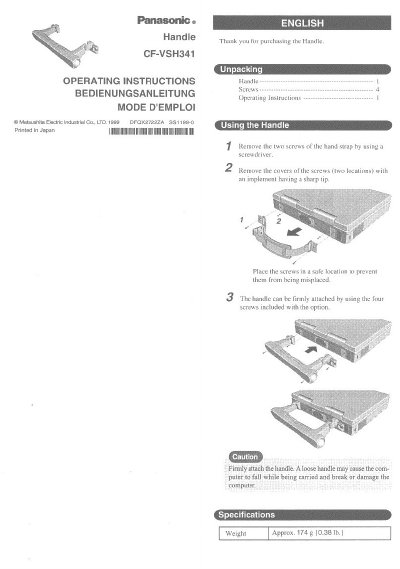
Panasonic CF-VSH341 Handle Operating Instructions


Panasonic CF-VSH341 Handle Operating Instructions - cover page
Brand
Panasonic
Category
Other Electronics
Document type
User Manual
Language
English
Pages
2
File format
PDF
File size
227 KB
Published
08 August, 2012
Updated
20 August, 2012
MD5 checksum
A76206FDFD272EA9327FF36FEE07C297

About this manual

This document provides operating instructions for the Panasonic CF-VSH341 handle. It details the unpacking process, which involves removing screws and covers from the hand strap. The guide emphasizes the importance of securing the handle firmly to prevent the computer from falling and being damaged during transport.

What's inside

  • Unpacking
  • Using the Handle
  • Installation Steps
  • Safety Warning

Specifications

WeightApprox. 174 g

Frequently asked questions

How do I remove the screws from the hand strap?

Remove the two screws of the hand strap by using a screwdriver.

How do I remove the screw covers?

Remove the covers of the screws with an implement having a sharp tip.

How many screws are included for attaching the handle?

The handle can be firmly attached by using the four screws included with the option.

Download PDF (227 KB)

More Panasonic Manuals


View all Panasonic manuals →