
Extech VFL Series PID Controllers Instruction Manual

This manual describes the function and usage of VFL series PID controllers

Extech VFL Series PID Controllers Instruction Manual - cover page
Brand
EXTECH
Category
Other Electronics
Document type
User Manual
Language
English
Pages
13
File format
PDF
File size
391 KB
Published
01 August, 2012
Updated
30 September, 2023
MD5 checksum
CA6EA62ED01DA6037F72D4D22F0DDC90

About this manual

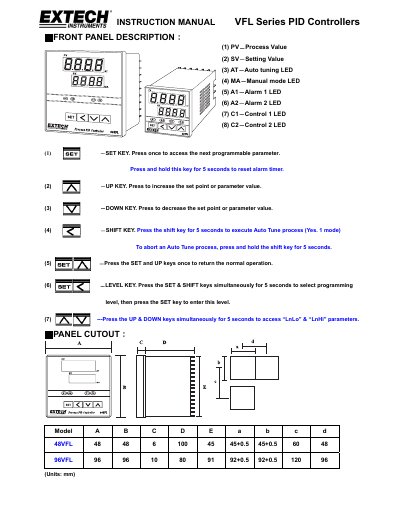
The Extech VFL Series PID Controllers are industrial devices designed for process control applications. The manual details the front panel layout, including indicators for Process Value (PV), Setting Value (SV), and various modes like Auto-tuning and Manual. It provides specific cutout dimensions for models A through E and outlines wiring precautions to ensure safety and signal integrity.

What's inside

  • Front Panel Description
  • Panel Cutout Dimensions
  • Wiring Diagram and Precautions
  • Programming Level Parameters
  • Parameter Description
  • Alarm Function
  • Automatic and Manual Output Control
  • Auto Tune Procedure
  • Error Message and Troubleshooting

Specifications

Baud Rate Options2.4k, 4.8k, 9.6k, 19.2k
Auto Tune Time LimitTwo hours
PID Control ModesON/OFF, PI, PD, P

Frequently asked questions

How do I reset the alarm timer?

Press and hold the SET key for 5 seconds to reset the alarm timer.

How do I abort an Auto Tune process?

Press and hold the SHIFT key for 5 seconds to abort the Auto Tune process.

What is the default value for the Proportional band (Pb)?

The default value for the Proportional band is 10.0%.

How do I access the 'LnLo' and 'LnHi' parameters?

Press the UP and DOWN keys simultaneously for 5 seconds to access these parameters.

Download PDF (391 KB)

More EXTECH Manuals


View all EXTECH manuals →