
Agilent 8453E UV-Visible Spectroscopy System Installation Guide

This document describes the assembly and installation steps of the Agilent 8453E UV-Visible spectroscopy system, including connecting the sample cell, connecting the control module, installing the printer, and setting up the power supply. User manual and service manual are also provided.
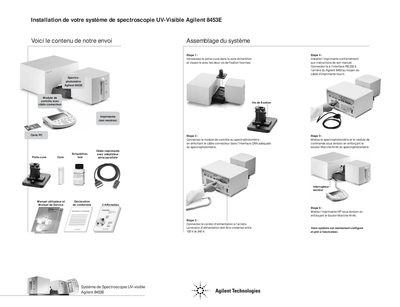

Agilent 8453E UV-Visible Spectroscopy System Installation Guide - cover page
Brand
Agilent
Category
Other
Document type
Installation Guide
Language
French
Pages
1
File format
PDF
File size
66 KB
Published
08 June, 2012
Updated
29 September, 2023
Model
8453E
MD5 checksum
8574D516D1C00878CEE6338BBDF87FFE

About this manual

This document provides instructions for assembling the Agilent 8453E UV-Visible Spectroscopy System. It details the physical assembly of the control module and the spectrophotometer, including the installation of the sample holder. This manual is written in French.

What's inside

  • Installation de votre systeme
  • Assemblage du systeme
  • Etape 1
  • Etape 2
  • Etape 3
  • Etape 4
  • Etape 5
  • Etape 6

Frequently asked questions

What voltage range is required for the Agilent 8453E system?

The power supply voltage must be between 100 V and 240 V.

How do you connect the control module to the spectrophotometer?

Plug the connector cable into the appropriate CAN interface of the spectrophotometer.

How do you turn on the Agilent 8453E spectrophotometer?

Press the spectrophotometer's On/Off button to apply power.

Download PDF (66 KB)

More Agilent Manuals


View all Agilent manuals →