
This file introduces how to use a spectrophotometer to measure, including operating methods, function introductions, etc.
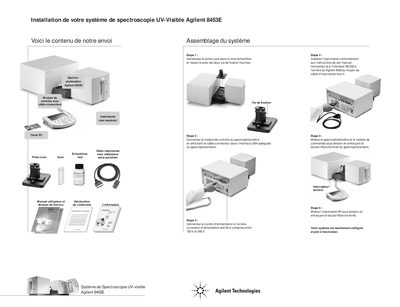
This document provides a brief overview of the components included in the Agilent 8453E UV-Visible Spectrophotometer System. The kit includes a control module with connector cable, a PC card, sample holder, cuvette, spectrophotometer, and printer (not shown). It also lists the User Manual and Service Manual as separate documents.
The guide details the step-by-step assembly process for the system. This involves installing the sample holder into the instrument, connecting the control module via the CAN interface, plugging in the power cord (compatible with 100V to 240V), setting up the printer according to its manual and connecting it via the RS-232 interface, and finally powering on both the spectrophotometer and the HP printer. This manual is written in French.
| Input Voltage Range | 100V to 240V |
|---|
The power supply must be between 100 V and 240V.
Press the power button labeled Marche/Arret.