
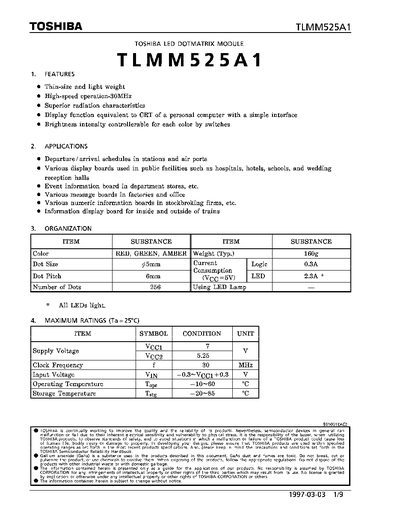
The document describes the Toshiba TLMM525A1, a thin-size and light-weight LED dotmatrix module designed for high-speed operation at 30MHz. It features a 16x16 LED array with red and green colors, offering superior radiation characteristics suitable for various public display applications such as departure boards in stations and information displays in factories.
The datasheet provides detailed technical specifications including maximum ratings, recommended operating conditions, input levels, and timing charts. It also explains the module's organization, block diagram, function explanations, surface brightness adjustment methods using switches and OSC inputs, pin connections for various connectors, precautions for usage, and physical dimensions.
| Clock Frequency | 30 MHz |
|---|---|
| Weight (Typ.) | 160g |
| Number of Dots | 256 |
| Dot Pitch | 6mm |
| Operating Temperature | -10~60 °C |
Applications include departure/arrival schedules in stations, various display boards in public facilities like hospitals and hotels, event information boards in department stores, and numeric information boards in stockbroking firms.
Brightness is adjusted using switches SW1 (BR), SW2 (BG), and SW3. When OSC input is not used, 8-step adjustments are enabled by the decoding switches; with OSC input, further adjustments are possible.