
Agilent 5065-4495 Flow Capillary Kit Installation Guide

This document describes the use of the 0.1 - 2.5 ml/min flow capillary kit and the hardware modifications required. The kit includes all the capillaries needed to work with a flow rate from 200 to 2500 µl/min.
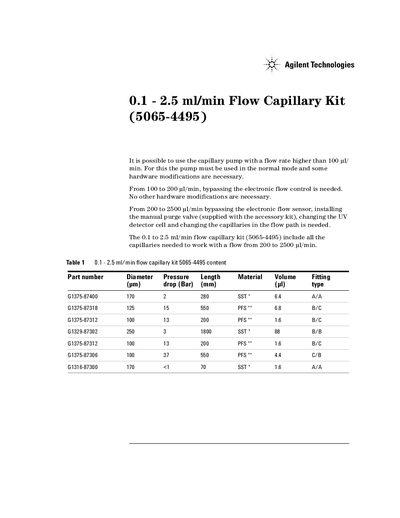

Agilent 5065-4495 Flow Capillary Kit Installation Guide - cover page
Brand
Agilent
Document type
User Manual
Language
English
Pages
4
File format
PDF
File size
68 KB
Published
08 June, 2012
Updated
29 September, 2023
MD5 checksum
798ED9CB0ABF50CB94DC444522A3E861

About this manual

This document provides installation instructions for the Agilent 0.1 - 2.5 ml/min Flow Capillary Kit, part number 5065-4495. The kit allows users to operate capillary pumps at flow rates higher than 100 ul/min by bypassing electronic controls and modifying hardware components.

What's inside

  • Flow Rate Modifications
  • Kit Contents
  • Tools Required
  • Installation Steps
  • Pressure Drop Data
  • Column Compatibility

Frequently asked questions

What hardware modifications are required to use the pump at flow rates between 200 and 2500 ul/min?

You must bypass the electronic flow sensor, install a manual purge valve supplied with the accessory kit, change the UV detector cell, and replace the capillaries in the flow path.

Which specific capillary should be used between the injection valve port 6 and the column if a thermostat is installed?

You must use capillary G1375-87306 when a thermostat (G1330A/B) is in place.

What are the maximum and minimum pressure drops for a 100 x 4.6 mm column at a flow rate of 2.5 ml/min?

The pressure drop ranges from a maximum of 272 bar to a lowest value of 112 bar.

Download PDF (68 KB)

More Agilent Manuals


View all Agilent manuals →