
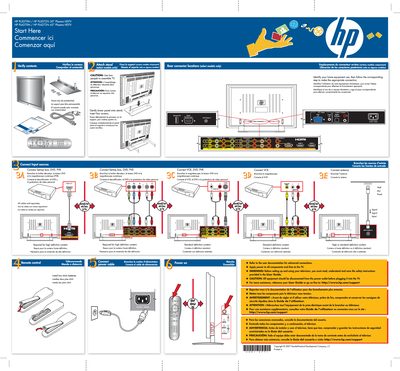
HP Plasma HDTV Quick Start Guide


HP Plasma HDTV Quick Start Guide - cover page
Brand
HP
Category
Television
Document type
Quick Start Guide
Language
English
Pages
1
File format
PDF
File size
2.8 MB
Published
04 June, 2012
Updated
04 June, 2012
MD5 checksum
B3DADCB4CE5D2FB5D5B38D11B82511C6

About this manual

The poster offers step‑by‑step setup directions for HP Plasma HDTV models, including stand attachment, rear connector locations, and input source connections. It is presented in English, French, and Spanish to aid users worldwide.

Safety instructions emphasize disconnecting power before handling, using two AAA batteries for the remote, and consulting the online user guide for advanced connections. All cables are sold separately, and support is available at hp.com/support.

What's inside

  • Start Here
  • Rear connector locations
  • Attach stand
  • Connect input sources
  • Remote control
  • Safety warnings
  • Cables
  • Power and batteries

Specifications

Screen size50 inches
Screen size42 inches

Frequently asked questions

How many people are required to assemble the TV?

Two people are required to assemble the television.

Are cables sold separately?

Yes, all cables are sold separately.

What batteries does the remote control use?

The remote control uses two AAA batteries.

Where can I find additional assistance for advanced connections?

Visit the HP support website at http://www.hp.com/support for more help.

Download PDF (2.8 MB)

More HP Manuals


View all HP manuals →