
This document describes the contents of the Modem-DK Embedded Modem Development Kit, including development boards, adapter boards, modem boards, and software tools. This kit is used to develop embedded modem applications based on Silicon Laboratories MCU devices.
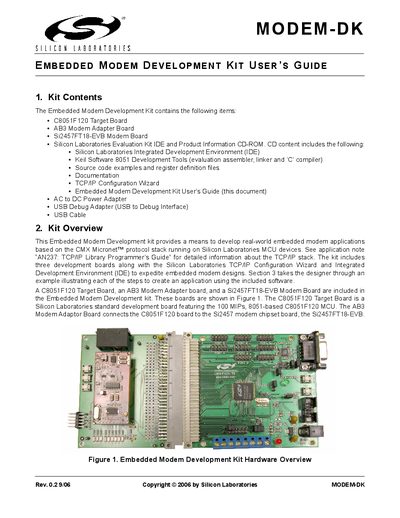
The Embedded Modem Development Kit (Modem‑DK) includes a C8051F120 target board, an AB3 modem adapter board, a Si2457 modem board, power and USB adapters, and a CD‑ROM with the Silicon Laboratories IDE and Keil tools. The kit provides everything needed to develop and test embedded modem applications using the CMX Micronet™ protocol stack.
The guide walks the user through hardware connections, software installation, configuration of PC modem settings, creation of TCP/IP firmware with the Configuration Wizard, IDE integration, building and downloading the project, and troubleshooting common issues.
| Target MCU | 100 MIPs, 8051‑based C8051F120 |
|---|---|
| Modem chipset | Si2457 |
| Host PC OS requirement | Windows 95 or later, Windows NT or later |
| Recommended RAM | 64 MB |
| USB port requirement | One available USB port |
Connect the Si2457FT18‑EVB modem board to the AB3 modem adapter board at JP1 and JP2, then connect the AB3 board to the C8051F120 target board at J24. Attach the USB Debug Adapter to the C8051F120 JTAG header with the ribbon cable, plug the USB cable into a PC, and power the boards with the AC/DC adapter at P1.
Insert the kit’s CD‑ROM into the PC, run the autorun installer, and follow the prompts to install the Silicon Laboratories IDE, Keil 8051 tools, and the TCP/IP Configuration Wizard. The software is installed by default under C:\SiLabs.