
Cygnal’s IDE provides all the tools necessary to develop and test your projects. The IDE interfaces with the C8051Fxxx MCU’s on-chip JTAG and emulation logic to provide in-system programming and non-intrusive, full speed, in-circuit emulation using the production device installed in the end application. Cygnal’s emulation system supports source-level debugging in C and assembly language with single-step execution (including stepping through interrupt service routines), run-to-breakpoint, and the inspection/modification of registers, data memory, and program memory. No additional target RAM, program memory, or communications channels are required. Digital and analog peripherals remain synchronized with program execution while single stepping. The Cygnal IDE runs under Windows 95/98/Me and Windows NT. The IDE communicates with the target MCU using the PC’s serial port. (The required RS232-to-JTAG protocol converter is included in all development kits.)
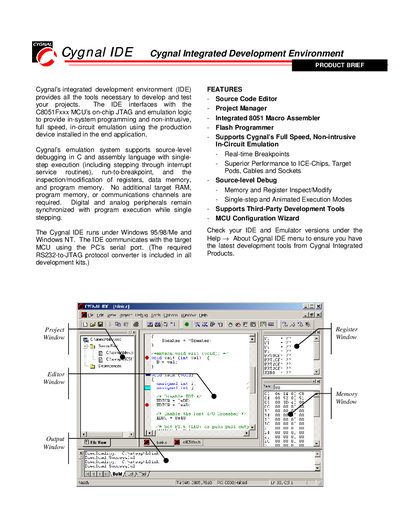
The Cygnal Integrated Development Environment (IDE) provides a complete set of tools for developing, testing, and debugging applications for Silicon Laboratories C8051Fxxx MCUs. It runs on Windows platforms and connects to the target MCU via a serial‑port JTAG interface.
Key features include a source‑code editor with syntax highlighting, an integrated 8051 macro‑assembler, a flash programmer, non‑intrusive on‑chip emulation, source‑level debugging, and a configuration wizard that generates peripheral initialization code.
| Supported MCUs | C8051Fxxx series |
|---|---|
| Communication Interface | PC’s RS232 serial port (RS232‑to‑JTAG converter) |
The IDE uses the PC’s serial port with an RS232‑to‑JTAG protocol converter to communicate with the MCU’s on‑chip JTAG.
Yes, flash programming and source‑level debug of Intel OMF‑51 absolute object files are fully supported.