
This document is a user manual for Gigaset A160/A260 series phones, which introduces the functions and characteristics of the phones, including battery charge status, internal number, display keys, message key, directory key, etc.
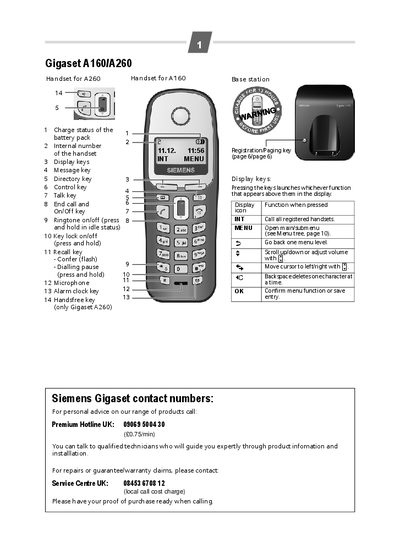
This manual guides you through the safe setup of the Gigaset A160/A260 handsets, including connecting the base station, installing the rechargeable battery pack, and registering the handset. It also covers safety precautions, battery handling, and environmental disposal instructions.
The guide explains how to make and receive calls, use the directory, manage speed‑dial and call lists, and adjust handset and base‑station settings such as language, alarm clock, and listening‑in features. An appendix lists specifications, recommended battery packs, and service contact information.
| Recommended battery pack | Nickel‑metal‑hydride (NiMH) |
|---|---|
| Base station power consumption (standby) | approx. 2 W |
| Base station power consumption (during a call) | approx. 3 W |
| Supported standards | DECT, GAP |
| Range | up to 300 m outdoors, up to 50 m in buildings |
| Base station power supply | 230 V / 50 Hz |
| Operating temperature | +5 °C to +45 °C |
| Operating humidity | 20 % to 75 % relative humidity |
Leave the handset in the base station for approximately 13 hours.
About 2 W.
Open the menu, go to Settings → Handset → Reset Handset and confirm.