
This document describes how to refill Canon 40, 41, 50, 51, 52 printer cartridges
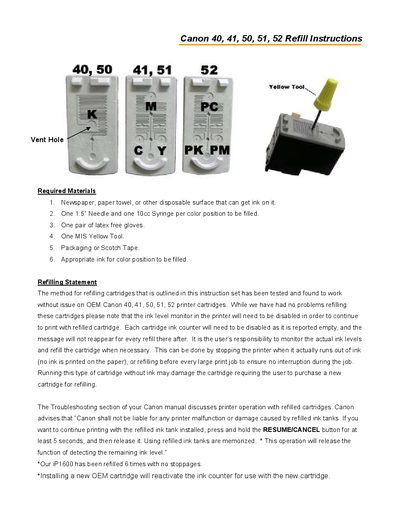
These refill instructions explain how to restore ink in Canon 40, 41, 50, 51, and 52 cartridges. Required items include a 1.5" needle, a 10 cc syringe, latex‑free gloves, a yellow drill tool, and appropriate ink for each color position.
The procedure covers removing the cartridge label, opening vent holes, injecting the correct amount of ink (6 cc for color cartridges, 20 cc for black), resealing the cartridge, and re‑installing it in the printer. The guide also notes that the printer’s ink‑level monitor must be disabled after refilling and provides troubleshooting tips.
| Needle size | 1.5" |
|---|---|
| Syringe capacity | 10 cc |
| Ink volume per color cartridge | 6 cc |
| Ink volume per black cartridge | 20 cc |
| Vent hole tool | Yellow drill tool |
Yes, the ink level monitor in the printer must be disabled for the refilled cartridge to work.
Inject 6 cc of ink for color cartridges (41, 51, 52) and 20 cc for black cartridges (40, 50).
A yellow drill tool is used to open all of the vent holes that were covered by the label.