
The CABLE ID P R I N T E R Mk2100/Mk1100 meets the requirements of beautiful print, speedy, and ease of use. Before using the printer, please read the instruction manual thoroughly and follow all instructions. Always operate the printer with the power supply and voltage rating described in the manual for your country. The printer uses thermal transfer printing method with 300dpi resolution. The printing speed is 25mm/s (High Speed Mode) and 18.5mm/s (Standard Mode), and the output rate is 35pcs/min (High Speed Mode) and 30pcs/min (Standard Mode). The printer uses exclusive ink ribbons, with black ribbon length of 100m and white ribbon length of 85m. The character sizes available are 1.3mm, 2mm, 3mm, and 6mm. The input modes include alphanumeric and symbol input, and the display capacity is 10 characters/line x 2 lines (full-width) or 20 characters/line x 2 lines (half-width).
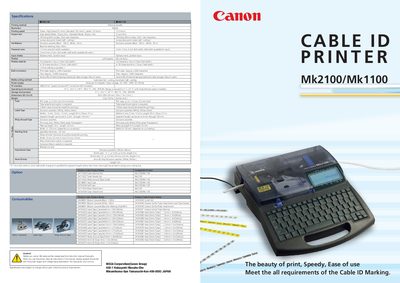
The Mk2100/Mk1100 is a cable ID marking printer that uses thermal‑transfer printing to produce high‑resolution (300 dpi) characters on tubes, wrap‑around tape, and label tapes. It supports multiple character sizes (1.3 mm to 6 mm) and offers both high‑speed and standard printing modes, with output rates up to 35 pcs/min.
The printer includes a 160 × 64‑dot LCD, built‑in memory for about 2,500 characters, and USB 2.0 full‑speed PC connectivity. It operates in temperatures from 15 °C to 32.5 °C, with an AC 100‑240 V power supply, and can handle tube diameters from 2.5 mm to 6.5 mm. Optional accessories such as tube warmers, feeders, and cases are listed in the options section.
| Printing method | Thermal transfer |
|---|---|
| Resolution | 300 dpi |
| Printing speed (high speed) | 25 mm/s |
| Printing speed (standard) | 18.5 mm/s |
| Output rate (high speed mode) | 35 pcs/min |
| Ink ribbon capacity (black) | 100 m |
| Display type | LCD Graphic (160 × 64 dots) |
| Built‑in memory capacity | ≈ 2,500 characters |
| Power supply input voltage | AC 100‑240 V, 50/60 Hz |
| Operating temperature range | 15 °C – 32.5 °C (59 °F – 90.5 °F) |
| Dimensions (W × D × H) | 250 × 300 × 85 mm |
| Weight (printer only) | 2 kg |
| Supported tube diameter | 2.5 mm – 6.5 mm |
It uses thermal‑transfer printing.
The printer accepts an AC input of 100 V to 240 V at 50/60 Hz.
Approximately 2,500 characters can be stored.
It operates from 15 °C to 32.5 °C (59 °F to 90.5 °F).