
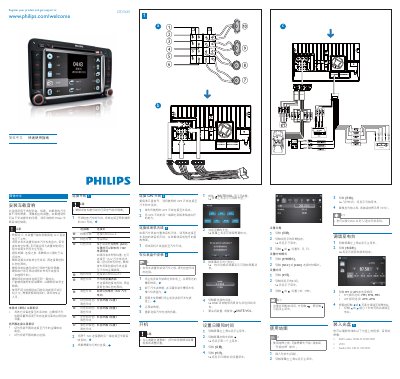
The guide explains how to install the CID3681 unit in the vehicle, connect the ISO power and speaker cables, and attach the GPS and radio antennas. It emphasizes using the supplied hardware, isolating loose wires with electrical tape, and ensuring the system is grounded to the vehicle chassis.
It also covers basic operation such as setting date and time, navigating maps, playing media from DVD, CD, or USB, pairing Bluetooth devices, making phone calls, adjusting volume, and configuring the equalizer. Safety warnings remind users not to operate the device while driving. This manual is written in Chinese.
| Operating voltage | 12 V DC (negative ground) |
|---|---|
| Power connector type | ISO connectors |
| Bluetooth default password | 0000 |
Connect the speaker wires to the appropriate terminals, avoiding direct connection to the vehicle’s metal chassis, and follow the colour‑coded wiring diagram.