
This manual introduces the installation, use methods of Philips CID3291 car audio, including installation steps, power on method, setting date and time, screen adjustment and so on.
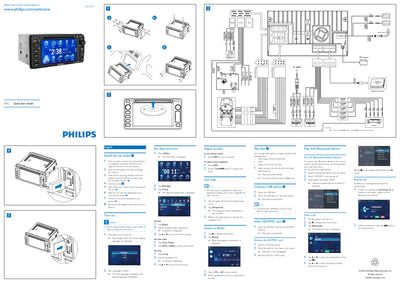
This guide shows how to install the CID3291 unit in a vehicle, connect power and AV cables, and secure the head unit to the dashboard. It also explains how to turn the device on, adjust the screen, and set date and time.
The guide then details basic functions such as navigation, radio, disc, USB, SD/MMC playback, and Bluetooth features, including pairing, making and receiving calls, and adjusting volume.
| Maximum Bluetooth devices | 8 |
|---|
Search for Bluetooth devices, select "CID3291" from the list, and enter the default password 0000.
Press the DISP button for more than two seconds to turn the screen off.
Slide the unit into the dashboard until a click is heard, then secure it with screws.