
Key facts
- Manuals
- 82
- Models
- 10
- Brands
- 19
- Languages
- ZH · JA · EN
- Last added
- 2026-10-03
Mobilephone Accessories models by brand
Featured Mobilephone Accessories manuals
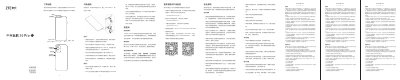
ZTE 9040N Mobile Phone User Manual
This manual explains how to safely operate the ZTE 9040N mobile phone, covering SIM card installation, charging, battery handling, and general usage precautions. It also details the low‑blue‑light (eye‑care) mode and how to enable it.
The document includes the warranty policy, service limitations, environmental compliance information, and safety warnings for use in hazardous environments, as well as contact information for ZTE service centers. This manual is written in Chinese.
Covers: Safety Information · SIM Card Installation · Charging and Battery Usage · Low Blue Light Mode · Warranty Policy · Precautions and Handling
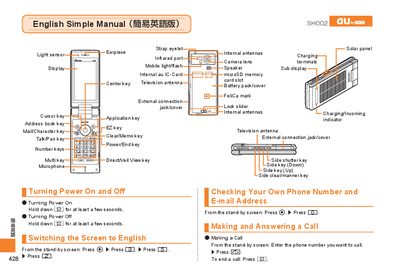
au Series Mobile Phone User Manual
This manual provides step‑by‑step instructions for using an au Series mobile phone. It explains how to turn the device on and off, switch the display language to English, check your own phone number and e‑mail address, and make or answer calls.\n\nAdditional sections cover address‑book management, camera functions for recording movies and taking snapshots, making international calls, and handy features such as Manner Mode and voice memo. The guide also includes information on emoji, predefined text messages, and other useful functions. This manual is written in Japanese.
Covers: Power On/Off · Switching Screen Language · Checking Phone Number and Email · Making and Answering Calls · Address Book Management · Camera (Movie and Snapshot)
Huawei LON-AL00 User Manual
This manual guides you through unpacking the device, charging it safely, and navigating the user interface. It covers basic operations such as making calls, sending messages, managing contacts, and using the camera, music, and video features.
Further sections explain network setup, application management, security and backup options, system settings, and advanced functions like reverse charging via USB‑Type‑C and using Huawei Cloud services. Safety warnings and legal notices are also included. This manual is written in Chinese.
Covers: Getting Started · Charging the Device · Network and Connectivity · Application Management · Screen and Display · Camera and Gallery
Huawei MC323 Mobile Terminal AT Command Interface Specification
The document provides a complete description of the AT command set used to configure and control the Huawei MC323 mobile terminal. It covers command syntax, parameter definitions, response formats, and example usage for basic configuration, security, serial port control, network services, and call handling.
It also includes detailed tables of final result codes, initial parameter values after a reset, and guidelines for implementing the commands in both hardware and software contexts. The specification is intended for developers and engineers integrating the MC323 into their solutions. This manual is written in Chinese.
Covers: Scope · Interface Overview · Basic Configuration Commands · Security Control Commands · Serial Port Control Commands · Network Service Interface Commands
Latest Mobilephone Accessories manuals
ZTE 9040N Mobile Phone User Manual
User Manual 2 pages · 1.4 MB · ZHThe ZTE 9040N user manual provides safety guidelines, usage instructions, warranty details, and low‑blue‑light mode setup.
au Series Mobile Phone User Manual
User Manual 21 pages · 5.6 MB · JASimple user guide for au Series mobile phones covering basic operations, calls, camera, and settings.
Huawei LON-AL00 User Manual
User Manual 265 pages · 31.9 MB · ZHThe Huawei LON-AL00 User Manual provides step‑by‑step instructions for setting up, using, and maintaining the smartphone.
Huawei MC323 Mobile Terminal AT Command Interface Specification
Programming Manual 106 pages · 1.5 MB · ZHThis specification defines the AT command interface for the Huawei MC323 mobile terminal device.
Philips D613 Mobile Phone User Manual
User Manual 3 pages · 552 KB · ZHThe Philips D613 mobile phone user manual provides specifications, features, and usage instructions for the 3G black CTD613BLK model.
Dimior 412G Mobile WiFi User Manual
User Manual 11 pages · 654 KB · ZHUser manual for the Dimior 412G Mobile WiFi, covering features, specifications, operation, and troubleshooting.
Sony Ericsson Mobile Phone User Guide
User Manual 77 pages · 2.7 MB · ZHChinese user guide for Sony Ericsson mobile phones covering features, menus, icons, and troubleshooting.
Pioneer SE-M290 products Manual
Pioneer SE-M290 over-ear headphones feature a 40mm driver unit and OFC litz cable for excellent sound quality. These headphones are closed-back, providing noise isolation for listening in any environment. The headphones also come with a 3.5mm plug and 6.3mm adapter for compatibility with a variety of devices.
Pioneer SE-DIR800C User Guide
The SE-DIR800C is a full-size, closed-type digital wireless Dolby surround sound headphone launched by Sherwood. It adopts Dolby surround sound technology and supports a variety of audio formats, which can bring users an immersive listening experience.
Pioneer SE-CLX40-K products Manual
These headphones feature low-resonance double layer vibration plates for clear high and middle frequency performance and powerful bass. The headphones are ergonomically designed for a comfortable fit and exceptional noise isolation. They also feature a self-fit holder for a secure, snug fit during active use.
Pioneer SE-CL331 products Manual
This is a pair of in-ear headphones produced by Sony. It has IPX5/IPX7 waterproof function, which can resist water, sweat and dust, and is suitable for use in various scenes.
Pioneer SE-CL07 products Manual
With over 70 years of engineering expertise in high-performance audio, you can trust Pioneer to deliver superior audio performance no matter the price or style preference. Pioneer’s range of core audio headphones exhibit the same quality craftsmanship and performance synonymous with Pioneer. This fully-enclosed dynamic stereo headphones feature 10 mm driver units, 100 dB sensitivity, 20 Hz to 20,000 Hz frequency response, 1.2m OFC litz wire, and weigh 3g without the cord. This product is not compatible with the first generation iPhone or any other device that features a recessed audio input. Specifications and design are subject to change without notice. Pioneer and the Pioneer logo are registered trademarks of Pioneer Corporation. iPhone and iPod are trademarks of Apple Inc., registered in the US and other countries. ©2010 Pioneer Corporation.
Pioneer SE-CE11 products Manual
Pioneer SE-MJ721I products Manual
EffEcts SE-MJ721I TM Type is a fully-enclosed dynamic stereo headphone with an impedance of 32Ω, sensitivity of 104dB, frequency response range of 6Hz to 28,000Hz, and a 40mm driver unit. It features a single-sided cord measuring 1.2 meters and a 3.5mm 4P stereo mini-plug. The headphone has STEEZ dance-inspired sound tuning, which enhances the presentation and impact of beat-producing instruments. It also has an Apple Certified in-line mic/control.
Pioneer SE-D10MT products Manual
This is a product manual for the Dubstep SE-D10MT TM model. The product is a fully-enclosed dynamic stereo headphone with an impedance of 32Ω, sensitivity of 105 dB, frequency response of 8 Hz to 28,000 Hz, and maximum input power of 1,500 mW. It features 40 mm driver units, a single-sided cord with OFC litz wire measuring 1.2 meters in length, and a 3.5 mm gold plated 4P stereo mini-plug. The product also offers interchangeable ear pads, professionally-inspired sound tuning, and a compact folding design.
Which document do I need?
User Manual
Day-to-day operation, settings and troubleshooting. Start here if the product is already set up.
Programming Manual
Instruction set, parameters and examples for configuring or programming the device.
Quick Start Guide
The shortest path to a working setup, usually only a few pages.
Questions answered in Mobilephone Accessories manuals
Can I use a non‑ZTE battery or charger with the ZTE 9040N?
No. Only ZTE‑authorized batteries and chargers should be used; using other accessories may cause damage or void the warranty.
How do I enable the low‑blue‑light (eye‑care) mode?
Open Settings → Display → Eye‑care mode, then choose “Enable now” or set it to auto‑start based on sunrise/sunset or a custom schedule.
How do I turn the phone on and off?
Hold down the F key for a few seconds to turn the power on or off.
How can I switch the screen language to English?
From the standby screen, press c, then 3, then 5, then 2.
How do I charge the Huawei LON-AL00 phone?
Connect the phone to a power outlet using the supplied USB cable and charger, or connect it to a computer via USB to charge.
How do I reset the MC323 device?
Use the ^RESET command as defined in the specification.
From: Huawei MC323 Mobile Terminal AT Command Interface Specification