
au W51S Phone User Manual

W51S (Simplified Chinese Version)
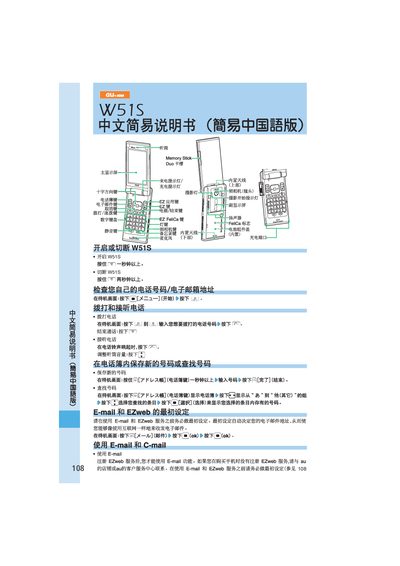

au W51S Phone User Manual - cover page
Brand
au by KDDI
Category
Cell Phones
Document type
User Manual
Language
Chinese
Pages
2
File format
PDF
File size
1.3 MB
Published
28 March, 2012
Updated
30 September, 2023
Model
W51S
MD5 checksum
8AD4FC8E375DF6BE81AB7B2396A27772

About this manual

This document is the simplified Chinese user manual for the au W51S mobile phone. It provides instructions on how to turn the device on and off, check contact information, and make or answer calls. The manual also details the setup and usage of email services (E-mail and C-mail) and the EZweb internet service. This manual is written in Chinese.

What's inside

  • Turning on and off W51S
  • Making and answering calls
  • Saving and finding numbers
  • E-mail and EZweb initial setup
  • Creating and sending E-mail
  • Using C-mail
  • Using EZweb
  • Using the camera
  • Making international calls
  • Other phone functions

Frequently asked questions

How do I turn on the W51S phone?

Press and hold the power key for more than one second.

How do I turn off the W51S phone?

Press and hold the power key for more than two seconds.

How do I set silent mode on the W51S phone?

Press and hold the silent mode key for more than one second on the standby screen.

How many characters can a C-mail message contain?

A C-mail message can contain up to 50 double-byte characters.

Download PDF (1.3 MB)

More au by KDDI Manuals


View all au by KDDI manuals →