
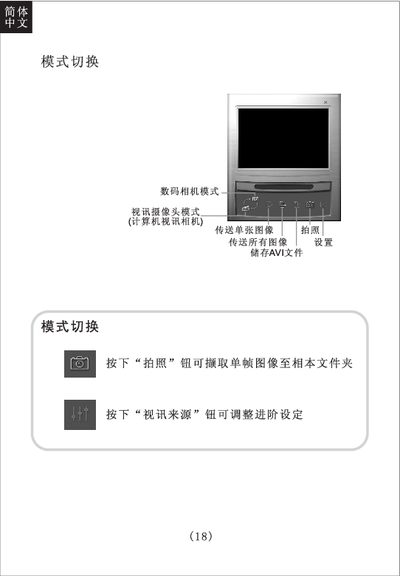
The guide walks you through basic operation of the digital camera, including switching between photo and video modes, capturing single frames or AVI video, and storing files on the internal memory or Smart Media card. It also describes how to use the LCD screen, flash, and self‑timer functions.
Additional sections cover focus adjustment, battery installation (AA 1.5 V alkaline or USB power), memory specifications, video recording steps, and how to shut down the camera safely. This manual is written in Chinese.
| Image sensor | 200万像素 CMOS Sensor |
|---|---|
| Software interpolation | 310万像素 |
| Video mode | QVGA (320×240) at 10 fps |
| Memory | Built‑in 16 MB SDRAM |
| Exposure control | Auto exposure and white balance |
| Autofocus range | 60 cm to infinity |
| Self‑timer | 10 seconds delay |
| Dimensions | 100 × 66 × 28 mm |
| Power source | 2 × AA 1.5 V alkaline batteries |
| Supported OS | Microsoft Windows 98SE/ME/2000 |
Open the battery compartment and insert two AA 1.5 V alkaline batteries, or connect the camera to a computer via USB for power.
Select the self‑timer mode; the LCD will show the timer, then press the shutter button. After 10 seconds the camera automatically captures the image.