
This document introduces the appearance and interface of Dell™ Dimension™ 2350 Series products
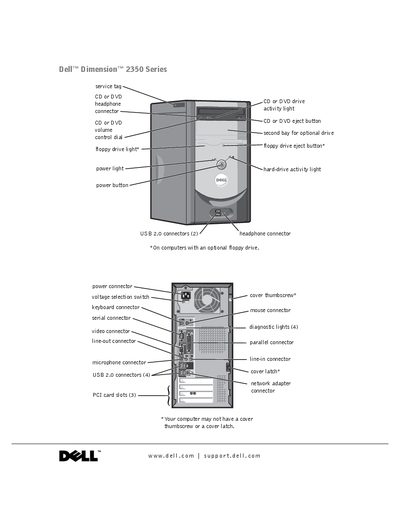
This manual covers the hardware layout of the Dell Dimension 2350 Series, describing the front and rear connectors, drive bays, USB ports, video and audio jacks, and optional components such as a second CD/DVD drive or floppy drive. Safety symbols, diagnostic lights, and basic ergonomic guidelines are also included.
The guide walks users through initial setup, installing printers, configuring network adapters, using Windows XP, copying CDs, and performing system restores. Detailed troubleshooting sections address common hardware and software problems, and the appendix provides specifications, warranty information, and contact details for Dell technical support.
Press the power button to shut down the computer.