
This is a Dell Dimension 3100C owner's manual, which details the computer's hardware configuration and features
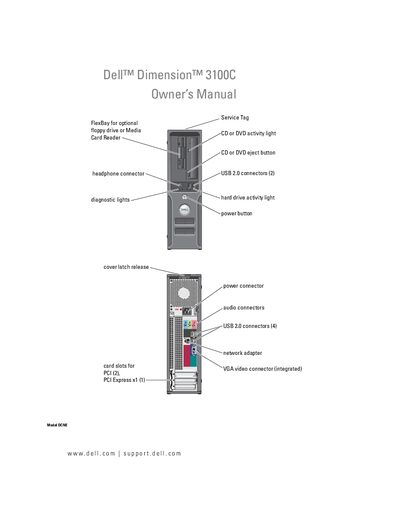
This manual covers everything you need to get started with the Dell Dimension 3100C, including hardware installation, connecting peripherals, setting up the operating system, and configuring power‑management options. Detailed sections walk you through installing memory, drives, and optional cards, as well as using the media card reader and DVD drive.
Later chapters focus on troubleshooting common issues such as battery problems, drive failures, network connectivity, and system errors. The appendix lists full technical specifications and provides guidance for BIOS setup, clearing CMOS, and contacting Dell support.
See the section "Replacing the Battery" for step‑by‑step instructions.
The manual explains the procedure in the "Clearing CMOS Settings" section.
Refer to the "Connecting to a Network Adapter" instructions for wiring and setup.