
The document describes the features and characteristics of the Dell™ Dimension™ 4700 series computer, including hardware configuration, interfaces, and connectors.
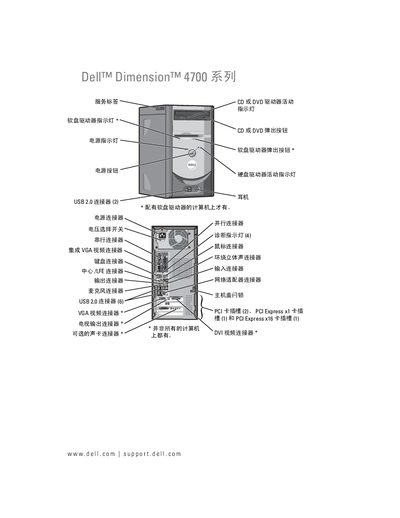
This manual covers the installation and use of the Dell Dimension 4700 desktop, including hardware components, driver installation, and system configuration. It also contains detailed troubleshooting steps for common issues such as power, display, and audio problems.
Key sections include hardware installation (memory, hard drives, PCI cards), peripheral connections (USB, VGA, DVI), network setup, system BIOS settings, and a comprehensive index for quick reference. This manual is written in Chinese.
| Memory type | DDR |
|---|---|
| USB ports | USB 2.0 |
See the section titled “添加第二个硬盘驱动器” for step‑by‑step instructions on installing a second hard drive.
The manual describes a BIOS password clearing procedure under “清除CM0S 设置”.
Follow the instructions in the “网络安装向导” section to configure network settings.