
DWA-130 is a Wireless N USB adapter that includes an installation CD-ROM, user manual, and warranty terms. To install, insert the CD-ROM and follow the on-screen prompts for driver installation. If the CD-ROM is missing, drivers can be obtained from D-Link. If the wireless key is forgotten, resetting the access point/router is necessary to obtain a new key. Possible reasons for wireless connection failure include incorrect insertion, improper driver installation, and mismatched wireless settings with the access point/router. DWA-130 supports operating systems such as Windows XP/2000/Vista.
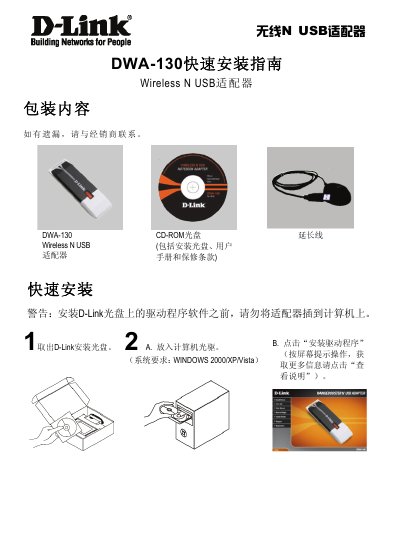
This guide provides step‑by‑step instructions for installing the DWA-130 Wireless N USB adapter on Windows 2000/XP/Vista systems. It lists the items included in the package, explains how to run the driver installation from the supplied CD, and warns not to plug the adapter in before the driver is installed.
The second part offers quick troubleshooting tips, such as what to do if the CD is missing, how to recover a forgotten wireless key, and common reasons why a wireless connection may fail. LED status indicators and basic network settings are also described. This manual is written in Chinese.
| Supported operating systems | Windows 2000/XP/Vista |
|---|---|
| Interface | USB |
| LED indicator status | LED stays on when driver installed correctly |
You can download the driver and manual from D‑Link’s support website.
Reset the wireless access point or router to obtain a new key, or contact the router’s manufacturer.