
This manual introduces the basic operation methods of Philips mobile phone, including power on/off, making phone calls, answering incoming calls, sending and receiving text messages, using tools, checking call records, etc.
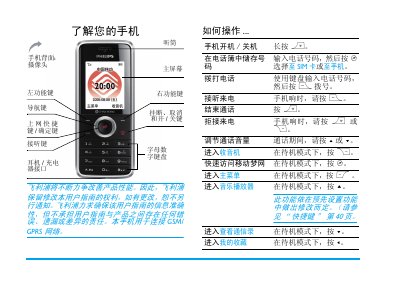
This manual provides step‑by‑step instructions for first‑time use of Philips mobile phones, including SIM card installation, battery charging, and micro‑SD card setup. It also explains how to make and receive calls, send messages, and use built‑in tools such as the radio, calculator, and alarm.
Additional sections cover advanced features like Bluetooth pairing, T9 text input, quick‑dial configuration, and handling multiple calls. The guide ends with safety notes, warranty information, and environmental compliance details. This manual is written in Chinese.
| Network | GSM / GPRS |
|---|---|
| Battery charging time | Approximately 3 hours |
| Micro‑SD card support | Supported |
| Bluetooth | Supported (Bluetooth™) |
| Text input method | T9® |
Connect the charger to the phone; the charging indicator will roll, and a full charge takes about three hours.
During a call, press the + or – keys to raise or lower the volume.