
This is the user manual of Philips SHB6000 Bluetooth stereo headset. It introduces the functions of charging, pairing, power on/off, music control, call control, LED indicator and sound indicator.
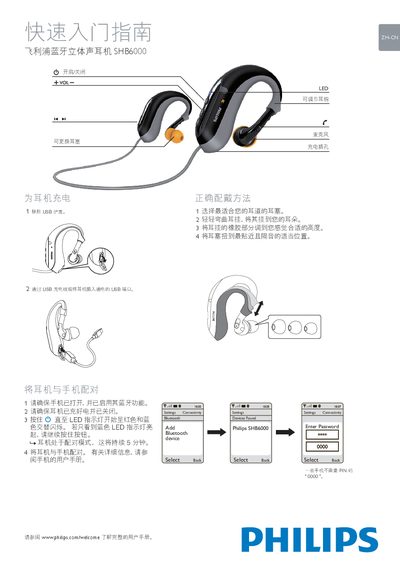
The SHB6000 is a Bluetooth stereo earphone from Philips. The manual explains how to charge the device, select the appropriate ear tips, and adjust the ear hook for a comfortable fit. It also guides you through pairing the earphone with a mobile phone using the standard Bluetooth procedure.
Operational controls are accessed by light taps on the earbud: play/pause, track navigation, answer/end calls, and mute the microphone. LED indicators convey connection status, incoming calls, low battery warnings, and charging completion, helping you monitor the earphone’s state at a glance. This manual is written in Chinese.
| Pairing mode duration | 5 minutes |
|---|---|
| Battery low indicator | LED flashes red three times per minute and emits two beeps |
| Charging complete indicator | LED off |
| Connected indicator | LED flashes blue once every 6 seconds |
Make sure the phone’s Bluetooth is on, the earphone is fully charged and turned off, then press and hold the button until the LED blinks; select "Philips SHB6000" on the phone and enter PIN 0000 if prompted.
It signals that the battery level is low; the LED flashes red three times per minute and the earphone emits two beeps.
Remove the USB cap, choose the ear tip that best fits your ear canal, adjust the rubber part of the ear hook to a comfortable height, and insert the ear tip into your ear.