
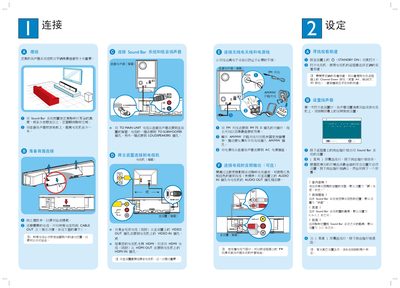
This manual explains how to place the Sound Bar and sub‑woofer for optimal sound, including recommended height (0.8‑1.2 m) and listening distance (2‑3 m). It also details cable routing, antenna connections, and power hookup.
The guide covers initial setup on the TV screen, selecting room presets, configuring audio sources (DVD, iPod, USB, MP3), and using the remote to enable surround‑sound modes. Additional sections describe HDMI/AV video connections, FM/AM antenna installation, and troubleshooting tips. This manual is written in Chinese.
| Speaker height setting | 0.8~1.2 m |
|---|---|
| Listening distance | 2~3 m |
| FM antenna impedance | 75 Ω |
Open the disc tray, insert the DVD with the label facing you, close the tray, and the system will start playback automatically; use the remote to select menu options if needed.