
This document is a quick start guide for DVP 5986K DVD player. It includes basic connections, settings, and playback methods.
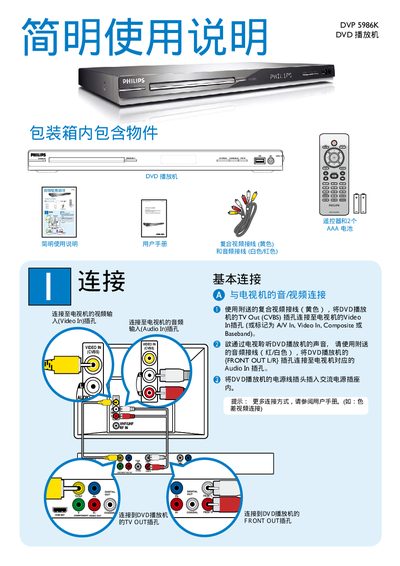
This manual describes the connection options for the DVP-5986K, including TV Out (CVBS), Video In (CVBS), and front audio out L/R. It explains how to select the appropriate input source and configure basic settings such as power on and standby.
The guide also covers playback functions, including the PLAY/PAUSE, STOP, DISC MENU, and STANDBY-ON buttons, as well as supported DVD formats like DIVX(R). Troubleshooting tips and user notes are provided at the end of the document. This manual is written in Chinese.
| TV Output | CVBS (composite video) |
|---|---|
| Video Input | CVBS (composite video) |
| Audio Output | Front L/R |
Press the STANDBY‑ON button.
It provides a CVBS (composite video) TV output.
Use the PLAY/PAUSE button on the remote or front panel.