
Philips Bluetooth stereo headset SHB1400 Quick Start Guide. Introduces how to use the headset, including how to connect to a mobile phone, adjust the volume, answer calls, reject calls, redial the last number, activate voice dialing, transfer calls to a mobile phone, mute the microphone, etc.
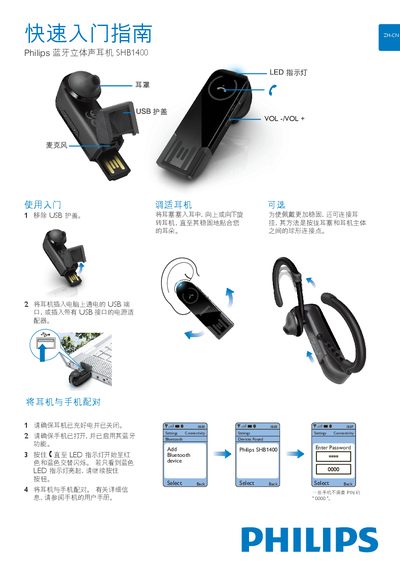
The guide explains how to get started with the SHB1400 earphones, including removing the USB cover, connecting the device to a USB power source, and pairing it with a mobile phone via Bluetooth. Detailed steps show how to hold the button until the LED alternates red and blue, then select the earphone on the phone.
It also describes everyday use: turning the earphones on/off, adjusting volume, checking battery level by pressing VOL+ and VOL‑, answering or rejecting calls, and interpreting LED patterns that indicate connection status, charging, low battery, and incoming calls. This manual is written in Chinese.
| Battery low indicator | LED flashes red 3 times per minute |
|---|---|
| Connection indicator | LED flashes blue every 3 seconds when connected |
Press and hold VOL+ and VOL‑ together; the LED will flash blue, red, or a combination to indicate the remaining charge.
It indicates that the battery level is low and needs to be recharged.