
Dell Inspiron 3656 Quick Start Guide
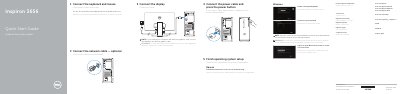
This Quick Start Guide covers initial setup of the Dell Inspiron 3656 computer. It describes connecting the keyboard and mouse, optional network cable, power cable, and display, then completing Ubuntu or Windows operating system setup, including security and updates, network connection, and account sign-in.
The guide also lists the computer's features and ports, including USB, audio, VGA, HDMI, network, memory-card reader, and expansion-card slots, and lists Dell support and regulatory information.
| Regulatory model | D19M |
|---|---|
| Regulatory type | D19M001 |
| USB 3.0 ports | 2 |
| USB 2.0 ports | 4 |
| Audio ports | 3 |
| Optical drive | Optional |
Connect the display to the discrete graphics card if the computer was ordered with one.
The guide covers Ubuntu and Windows setup, including security and updates, network connection, and account sign-in.
Support and manuals are available at Dell.com/support and Dell.com/support/manuals.