
Key facts
- Brand
- au by KDDI
- Model
- W52S
- Category
- Cell Phones
- Documents
- 2
- Languages
- ZH
- Last added
- 2012-03-28
Start here
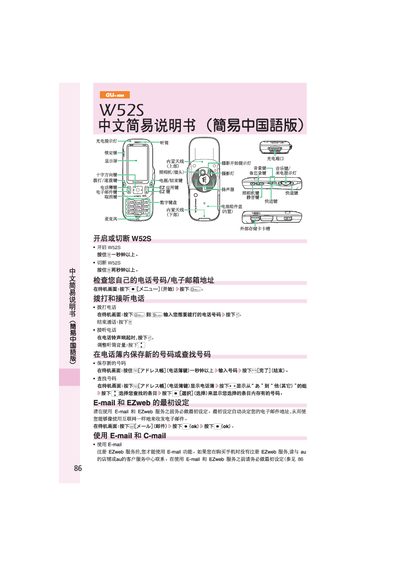
au W52S User Manual
This manual explains how to operate the au W52S phone, including making and receiving calls, adjusting volume, saving contacts, and navigating the standby screen. It also covers basic settings such as silent mode and voice message reception.
Additional sections describe how to set up and use E‑mail, C‑mail, and EZweb services, as well as how to take photos, send international calls, and access other phone functions like the camera and multimedia features. This manual is written in Chinese.
All au by KDDI W52S documents by type
Day-to-day operation, settings and troubleshooting. Start here if the product is already set up.
Questions answered in these manuals
How do I make a call with the au W52S?
From the standby screen press the call button, enter the phone number, and press the start button to place the call.
From: au W52S User Manual
How can I send an E‑mail from the phone?
Press the mail button, select "New mail", fill in the recipient, subject and body, then press the send button.
From: au W52S User Manual
How do I register the EZweb service on the W52SA?
You must complete the initial setup of the phone before registering the EZweb service; see the section titled “EZweb基可以赴誠通辻施的au手机享受互隊岡的一和信候服色”.